
This is preview documentation. The official release is not yet available.
defaultMemoryStoreIds or select it through memoryStoreIds when creating a Session. The Agent uses memory_store_list and memory_store_read on demand; the documents are not automatically inserted into every model request.
Shared knowledge and conversation records have separate lifecycles. The current Managed HarnessAgent path mounts shared Stores read-only. Authorized users or application backends create and update documents through management APIs. Working notes, chat history, and task artifacts are not automatically written back to a Store. Reusable behavioral procedures belong in Workspaces and Skills.
Use the platform identity variables and an available ENVIRONMENT_ID from the deployment guide. The following steps create a sourced glossary entry and verify that a Managed Agent actually reads it.
Create a Store and add knowledge
Create a product knowledge Store and write the project’s definition of Lark toproduct/glossary.md. expectedVersion: 0 requires that the path not yet exist, avoiding an accidental overwrite when repeating the exercise. Save STORE_ID for the resource binding below.
id. Record verified, reusable findings and their sources; do not maintain unconfirmed assumptions as facts.
Bind and verify
A Store binding and tool configuration work together: the binding selects accessible knowledge, while tools provide the operations used to read it. The following creates a Managed knowledge assistant withSTORE_ID as its default source and explicitly enables the two read operations. To reuse an existing Agent, update defaultMemoryStoreIds through default resource configuration and enable these operations using the tool guide, retaining its other tools.
definition.defaultMemoryStoreIds should contain this Store. The example uses agentKey: "knowledge-assistant"; retain the returned AGENT_ID when repeating the exercise, or choose another key for a separate Agent. Create a Session next, omitting memoryStoreIds so it inherits the saved default.
memoryStoreIds contains the actual STORE_ID, then submit a task asking the Agent to read the project glossary, explain Lark, and cite the document path. Follow snapshots and events for $SESSION_URL using the Session guide. Verify a knowledge-tool read of product/glossary.md and an answer preserving the weekly-report archival definition. A similar answer without a corresponding read does not establish that the Store was used.
To select the Store for only one Session, explicitly send memoryStoreIds: ["ACTUAL_STORE_ID"] during Session creation. This replaces that Session’s complete list rather than appending to the Agent defaults; include every desired ID when using multiple Stores. Omission inherits defaults, while [] attaches none of the default Stores. Changing an Agent’s default list does not change existing Session selections.
Read and write access
The current Managed HarnessAgent execution path mounts shared knowledge asread_only, allowing tasks to query maintained sources. Enabling memory_store_write or memory_store_edit from the tool catalog does not bypass that mount restriction. Environment config.memoryAccess accepts read_only and read_write, but selecting read_write does not enable shared-knowledge writes through the current Managed path.
Maintain knowledge through the management APIs on this page, which require resource editing permission. An application backend can review source material and PUT a document, while the running Agent reads it. To promote task output into shared knowledge, have the application explicitly review and write it; discussing a conclusion does not save it to the Store.
memory_store_list and memory_store_read access bound Stores through the platform. When file and Shell tools run on a self_hosted Worker, knowledge reads do not become access to a Worker-local directory. Mentioning a Store name or disk path, or enabling a read tool, does not replace binding the resource by ID.
Maintain documents
Read the current content andheadVersion before a document PUT, then submit the new content with that expectedVersion. On conflict, reread and merge instead of overwriting another maintainer’s work. Use Redact when sensitive history must be removed. Archiving prevents subsequent resolution or reads from using the Store; deletion removes its documents and history. Inspect consumers and retention requirements before maintenance.
A Session pins the Store ID, not a snapshot of the shared document contents. After a management API update, submit another task in the same Session asking for a fresh read of the same path, and inspect the returned content. Earlier messages or artifacts retain their old quotations, so distinguish new tool results from conclusions already present in the conversation.
If retrieval misses the expected knowledge, inspect the binding, archive state, document path and tool capabilities, then verify in a new conversation. Mentioning a Store name in instructions does not establish a resource binding.
Next: Managed Agents · Vault.
Start with the inline sources in the CRM proposal case to verify citations and missing information. Then move its three sources into Memory and test authorized reads and source updates.
Inspect in the console
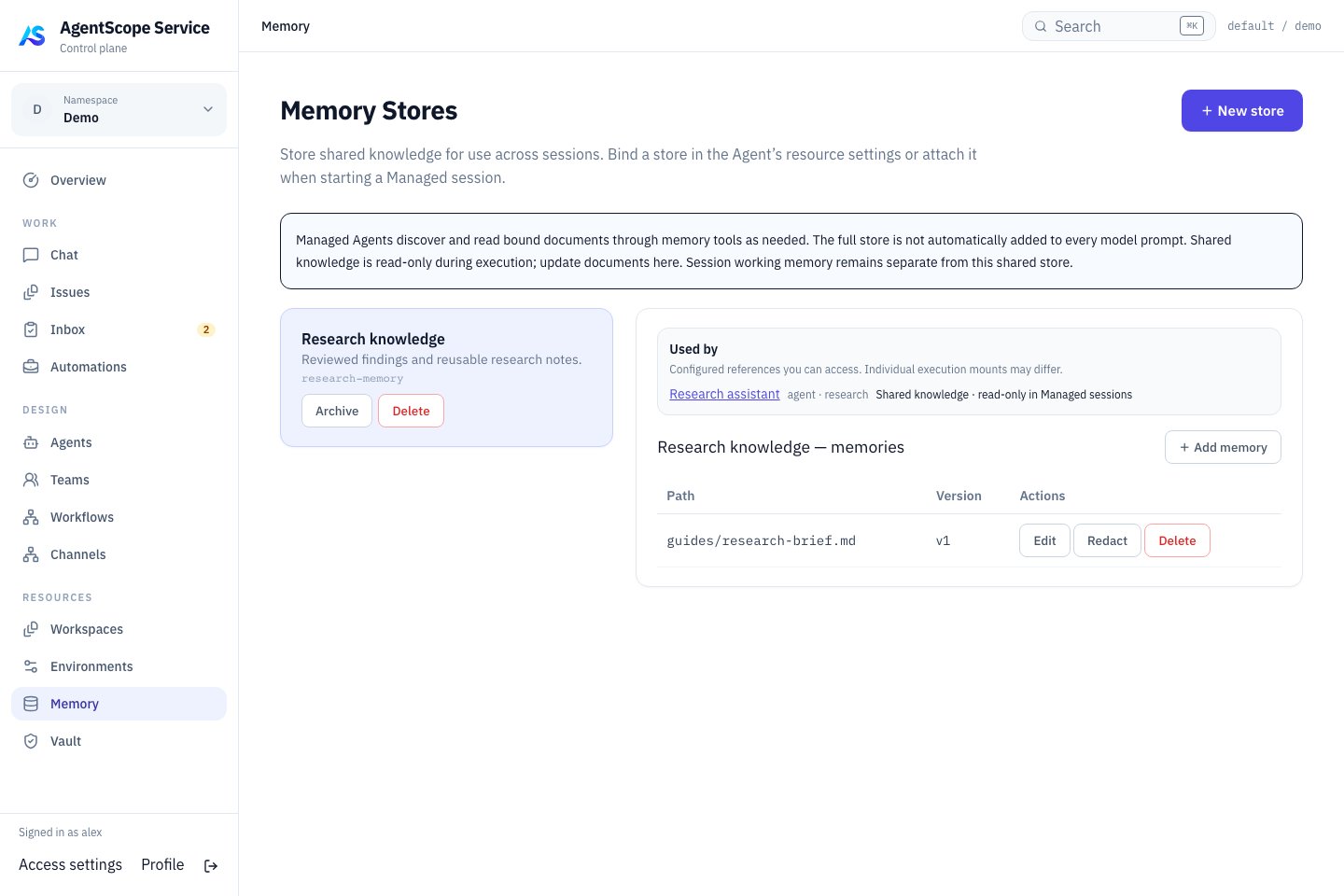
Current console UI with fixed demonstration data.
Management APIs and versions
Use a platform user Bearer token andX-AgentScope-Tenant and X-AgentScope-Namespace; prepare variables as in the deployment preparation. Reads require inspect, mutations require edit, and creation requires namespace resource creation rights. Listings contain only inspectable Stores.
Below, path is a document path such as product/glossary.md. Encode individual URL path segments while preserving directory separators. versions/ is reserved for history reads and should not prefix a document path.
Store listings support
limit (1–500), offset (requires limit), and X-Total-Count. There is currently no PATCH endpoint for a Store’s name or description.
Each document PUT creates a version. Use expectedVersion:0 for creation; for an update, read and submit the current headVersion. A changed version returns 409, requiring a reread and merge. Omitting the condition allows overwriting current content. Ordinary updates retain old versions. Redact removes sensitive content from stored history but does not change text already copied into sessions, artifacts, or other systems.