
This is preview documentation. The official release is not yet available.
defaultVaultIds or select it through vaultIds when creating a Session. At runtime, credentials from the attached Vaults are resolved for matching MCP connections. Creating a Vault or saving a secret does not itself authenticate an Agent.
The Agent definition declares connection addresses and tools, while Vaults hold authentication material. This lets different Sessions using the same Agent use different authorizations. Tool credentials authenticate access to external systems; the platform TOKEN or Application key authenticates an application calling Service. Public resource APIs return credential metadata after creation, without returning the secret again.
Use the platform identity variables from the API identity setup. Before verification, configure a Managed Agent’s MCP connection using the tool guide and retain AGENT_ID. This page uses the connection name reports and variable REPORTS_TOKEN; adapt both names and the service URL to your actual connection.
Create a Vault and add a credential
Create a Vault for the report-service credentials and retain the returnedVAULT_ID. Credentials added next belong to this collection. Session creation attaches the Vault ID, while rotating an individual credential uses that credential’s own ID.
credential.json readable only by your user, replacing the placeholder with a token issued by the external service. Do not commit the real file:
id for updates, checks, and deletion. Rotate by PATCHing that credential’s secret; the request does not issue a new token in the external system.
Configure a connection
Choose the credential type for the MCP connection, bind the resource to the Agent, configure its connection, and verify authentication with a read-only tool call.
OAuth content requires
access_token and can include refresh information as needed. Saving a credential does not grant external permissions.
Bind credentials to a Managed Agent
The Agent definition’smcpServers declares the connection, and a matching mcp_toolset in tools selects the tools it exposes. The Vault supplies credentials when that connection runs. Saving a credential does not add tools to an Agent or establish an MCP connection. See how tools belong to an Agent for the complete declaration and binding path.
To attach this Vault by default in new Sessions, set defaultVaultIds to a list containing VAULT_ID and follow the complete GET/PATCH procedure in setting Agent defaults. It preserves other definition fields and includes the current version. The array represents the complete default collection, so include other Vaults you want to retain. Changing this default does not change existing Session mounts.
The API type values are static_bearer, mcp_oauth, environment_variable and api_key. The api_key type is generic storage; it does not automatically configure model authentication or inject into tools. Environment-variable credentials are not globally exported to the Dataplane or arbitrary Shell processes either.
For example, create an environment_variable credential with Target REPORTS_TOKEN and the external service’s token as Secret. Reference it explicitly in the MCP connection. This connection fragment uses a placeholder URL; replace it with your service endpoint:
mcpServers and select the matching HTTP transport. In the same definition’s tools, associate an mcp_toolset through mcpServerName: "reports" and enable the required tools. Save the definition, create a new Session with this Vault attached, and verify a read-only call. With static_bearer, instead set Target to reports or the full endpoint; the resolver supplies the Bearer header without this placeholder. Use one clear authentication method per connection to avoid competing credentials for the same target.
Select Vaults for a Session
After the Agent has the matching MCP configuration, create a Session with this Vault attached. The request explicitly suppliesvaultIds, affecting this Session without changing the Agent defaults. If the Agent already sets defaultVaultIds, omit the field to inherit that collection. An explicit [] attaches none of the default Vaults.
vaultIds should contain the created Vault ID. This confirms resource selection, but you still need to submit a Turn requesting a real read-only MCP call to verify authentication. Follow tool verification to inspect calls, returned data, and Session errors. If the external system rejects access, check the connection name or URL, credential type, Header placeholders, and actual authorization scope.
vaultIds replaces the complete list for this Session rather than appending to Agent defaults. To combine Vaults, supply all their IDs and avoid competing credentials for the same connection or variable name. Each Vault in the request must be accessible to the calling identity.
OAuth connections
Use Vault OAuth connection APIs when a user needs to authorize access on the provider’s site. Paths below are relative to/api/vaults/{vaultId}:
Open the returned
authorizationUrl in a browser and complete provider authorization. After callback success, the initiating user must call complete to save the credential; creating a connection alone does not authorize it. The flow checks its browser-bound cookie and initiator identity, so it is not an unattended token import. GitHub connections use provider:"github" and require administrator integration settings; see Integrations.
Validate and rotate
validate checks local decryption and attempts a bounded reachability probe for HTTP(S) targets; it does not send the secret to verify provider permissions. ok:true does not establish external authorization. Inspect the checks and perform an actual tool call. Confirm the replacement token externally, then PATCH that credential’s secret. A Session retains the Vault ID, and later runtime resolution reads the available credentials; it does not freeze the creation-time secret into the Agent definition. Verify rotation with a new read-only call. Requests already sent to external systems are not recalled by rotation. Inspect consumers before deletion to avoid interrupting several Agents.
Keep secrets out of Instructions, AGENTS.md, conversations and public examples. Encrypted Vault data depends on the deployment master key; recovery requires both the database and the original key.
For failures, check the exact Target, explicit variable references, Vault binding and external permissions. Do not paste secrets into Chat for diagnosis.
Next: Agent tools · Backup and recovery.
Inspect in the console
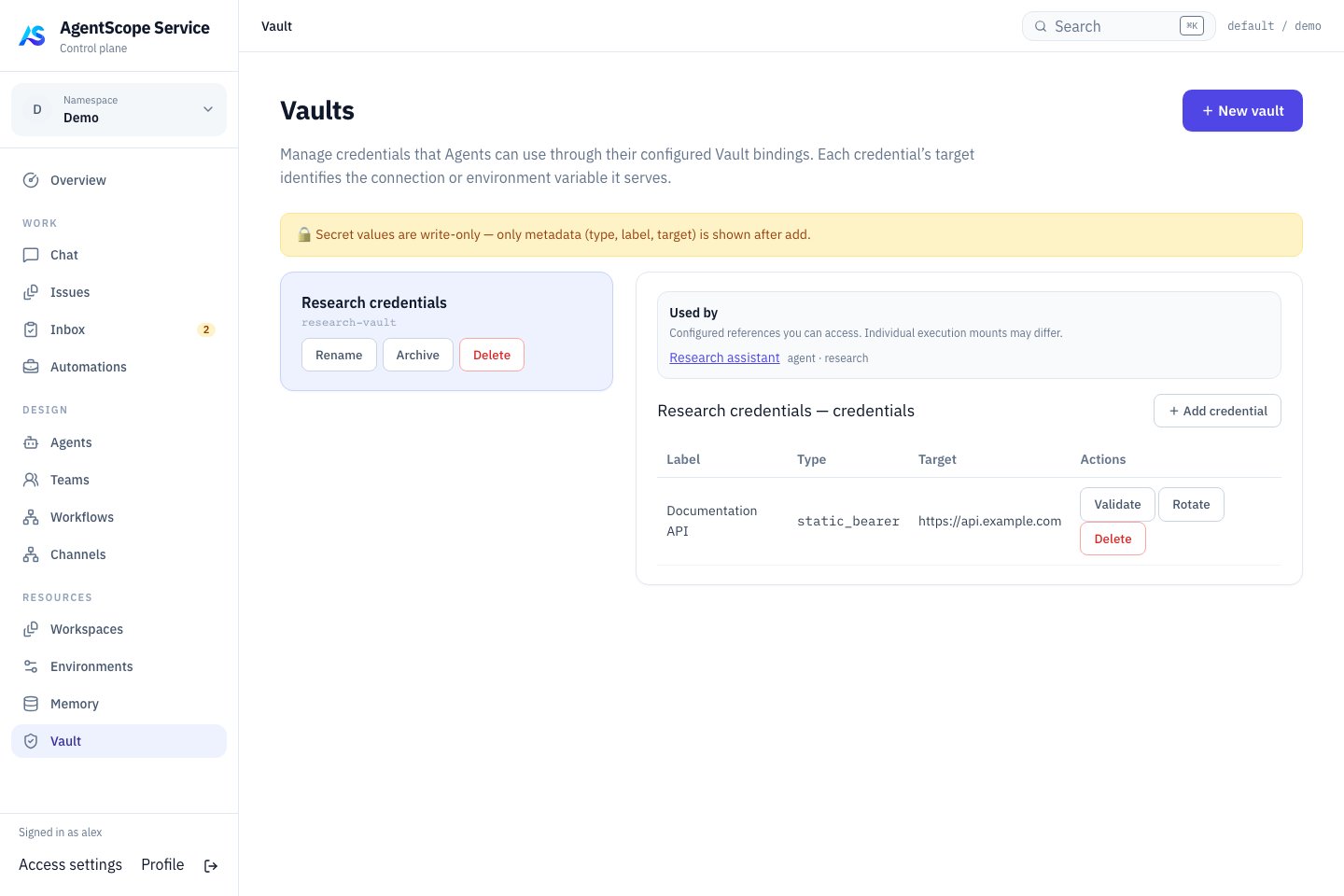
Current console UI with fixed demonstration data.
Management APIs
Use a platform user Bearer token withX-AgentScope-Tenant and X-AgentScope-Namespace; prepare variables as in the API identity setup. Reads require inspect, mutations require edit, and creation requires namespace resource creation rights. Listings are filtered to inspectable resources; Agent binding also checks dependency access.
Vault listings support
limit (1–500), offset (requires limit), and X-Total-Count. Vault and static credential PATCH currently have no version condition; inspect current metadata before updating and avoid concurrent overwrites. Credential responses contain id, type, label, target, and createdAt.